CompTIA called it a Capstone project: opening and closing a bunch of applications (web browser, graphics rendering apps, etc…) and monitor the CPU usage.
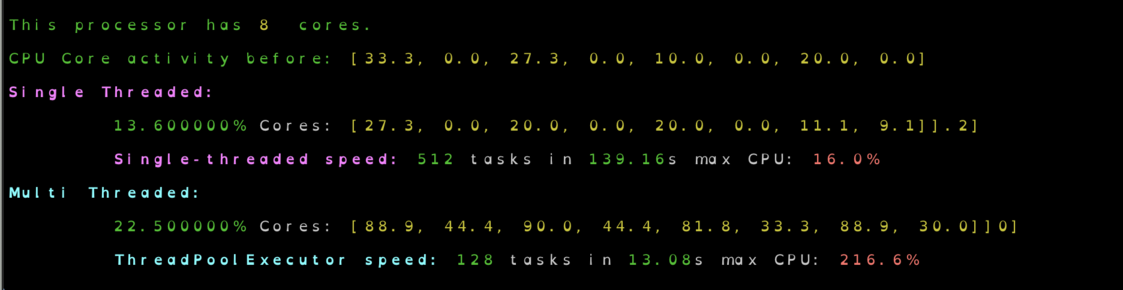
But I bet you could tax the processing with Python and monitor it that way. So I found this cool starting point and adapted it to give output like this:
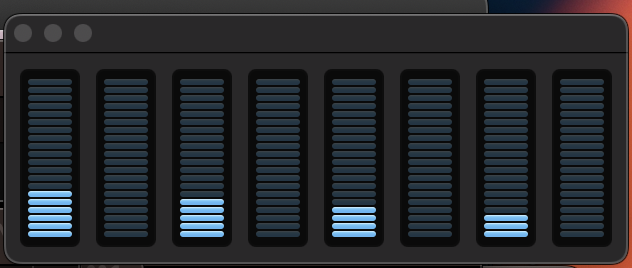
And on MacOS there is the lovely activity monitor CPU window:
Here’s the code
(hint) you will need to pip install psutil (docs), likely in a virtual environment (python -m venv somedir and then (in Linux type os) source somedir/bin/activate).
#!/usr/bin/env python3
"""
Tax CPU and monitor usage
Run: `python taxCPU.py` or in interactive mode: `python -i taxCPU.py`
You can simultaneously monitor:
  - Windows Task Manager: Press Ctrl + Shift + Esc or right-click the taskbar and select "Task Manager."
  - Mac Activity Monitor: Open Spotlight Search (Cmd + Space), type "Activity Monitor," and press Enter.
"""
import os
import psutil
import time
from concurrent.futures import ThreadPoolExecutor, ProcessPoolExecutor, as_completed
import asyncio
from tqdm import tqdm


p = psutil.Process(os.getpid())
maxcpu=0
def pure_python_task(task_id):
    result = 0
    global maxcpu
    for i in range(10000):
        time.sleep(5**-20)
        result += i * i * (i % 7) + (i % 11) * (i % 13)
        if i % 10**16 == 0:
          cpu = p.cpu_percent()
          maxcpu = max(cpu, maxcpu)
          print("\t\033[32m{:0%}\033[0m Cores: \u001b[33m{}\u001b[0m".format(
              cpu / 100,
              psutil.cpu_percent(interval=0.1, percpu=True)),
              end='\r')
    return result

async def async_pure_python_task(task_id):
    #TODO look into if this would make any difference since not making IO requests.
    result = 0
    for i in range(1000000):
        time.sleep(5**-40)
        result += i * i * (i % 7) + (i % 11) * (i % 13)
        if i % 10**16 == 0:
          print("Processing used (async): \u001b[0m{:0%}\u001b[0m".format(p.cpu_percent() / 100), end='\r')
    return result

def run_single_threaded(task_ids):
    start = time.time()
    [pure_python_task(task_id) for task_id in task_ids]
    end = time.time()
    print(f"\n\n\t\033[1;35mSingle-threaded speed:\033[0m \u001b[32m{len(task_ids)}\u001b[0m tasks in \u001b[32m{end-start:.2f}\u001b[0ms max CPU: \033[91m{maxcpu}%\033[0m\n")
    return end - start

def run_thread_pool(task_ids, max_workers=8):
    start = time.time()
    with ThreadPoolExecutor(max_workers=max_workers) as executor:
        list(executor.map(pure_python_task, task_ids))
    end = time.time()
    print(f"\n\n\t\033[1;36mThreadPoolExecutor speed:\033[0m \u001b[32m{len(task_ids)}\u001b[0m tasks in \u001b[32m{end-start:.2f}\u001b[0ms max CPU: \033[91m{maxcpu}%\033[0m\n")
    return end - start


if __name__ == "__main__":
    print("\n\u001b[32mThis processor has \u001b[33m{}\u001b[0m\033[32m cores.\033[0m\n".format(psutil.cpu_count()))
    print("\u001b[32mCPU Core activity before: \u001b[33m{} \u001b[0m\n".format(psutil.cpu_percent(interval=0.1, percpu=True)))
    print("\033[1;35mSingle Threaded:\033[0m\n")
    run_single_threaded(range(2**9))
    maxcpu=0
    print("\033[1;36mMulti Threaded:\033[0m\n")
    run_thread_pool(range(8**2 * 2), max_workers=8)